
Stop Hunting Through Orders for What Matters
Tag orders with colour-coded labels like “Urgent”, “VIP” or “Follow Up” so your team can spot what matters at a glance. Full support for WooCommerce HPOS and Subscriptions.
Download from WordPress.org Get Pro — £24/year + VAT
Works with WooCommerce 7.1+ · HPOS compatible · WordPress 6.2+
Sound Familiar?
Your team scrolls through the same order list every day, trying to remember:
- Which orders are urgent and need shipping today
- Which customers are VIPs who get priority treatment
- Which orders are waiting on a reply and easy to forget
Statuses alone cannot capture this. Notes get buried. Nothing is visible at a glance — so things slip through the cracks.
Colour-Coded Tags. Visible Everywhere. One Click Away.
Order Tags & Labels adds a simple tagging layer to your order screens and Orders list. Assign a tag, see it everywhere, filter by it instantly.
Spot what matters
Colour-coded tags on the Orders list mean your team sees priority orders without opening a single one.
Tag automatically
Set rules once — orders get tagged the moment they match, based on total, payment method, products, customer type and more.
Filter and bulk-manage
Filter the Orders list by any tag, then bulk add, remove or export the matching orders in seconds.
Everything You Need
Unlimited tags
Create as many colour-coded tags as you need — no five-tag cap.
Auto-tag rules
Tag orders automatically by total, payment method, shipping method, products, customer role, new or returning customer, order status or subscription status.
Filter the Orders list by tag
Narrow the WooCommerce Orders list down to one tag in a click.
Bulk add and remove tags
Change tags on many orders at once, straight from the Orders list.
CSV export
Export tagged orders to CSV for reporting or further processing.
Full HPOS support
Built for WooCommerce High-Performance Order Storage from day one, and still works on legacy post-based storage.
WooCommerce Subscriptions
Auto-tag rules can reference subscription status too.
See It in Action
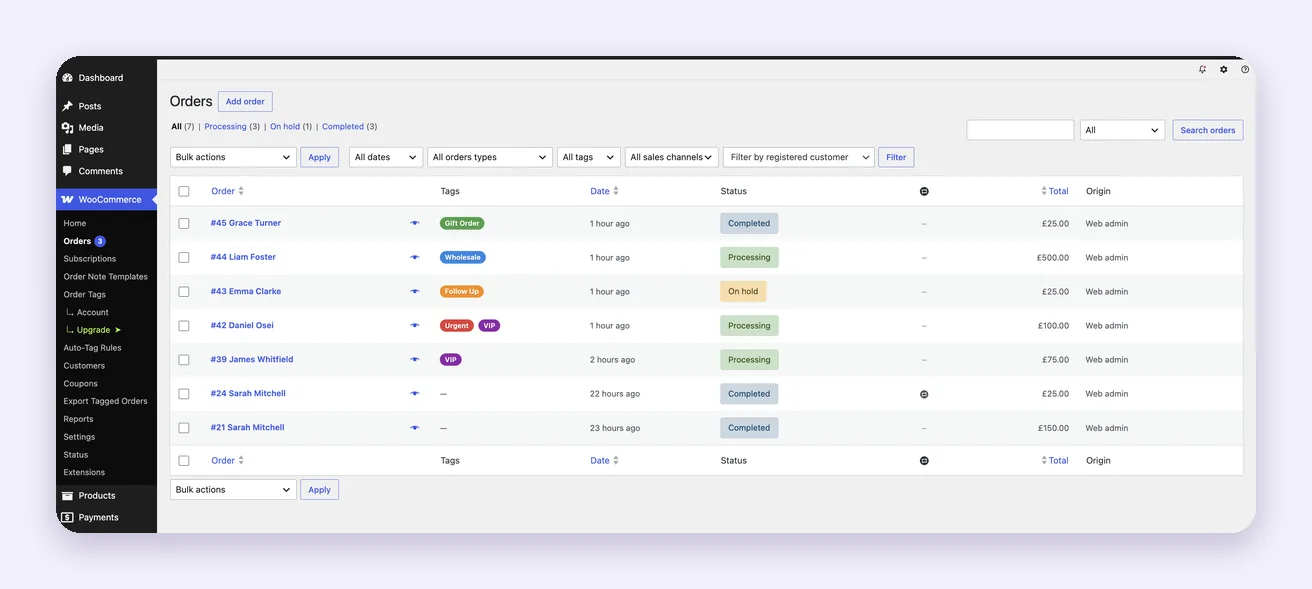
Tags column on the Orders list — priority orders visible without opening one.
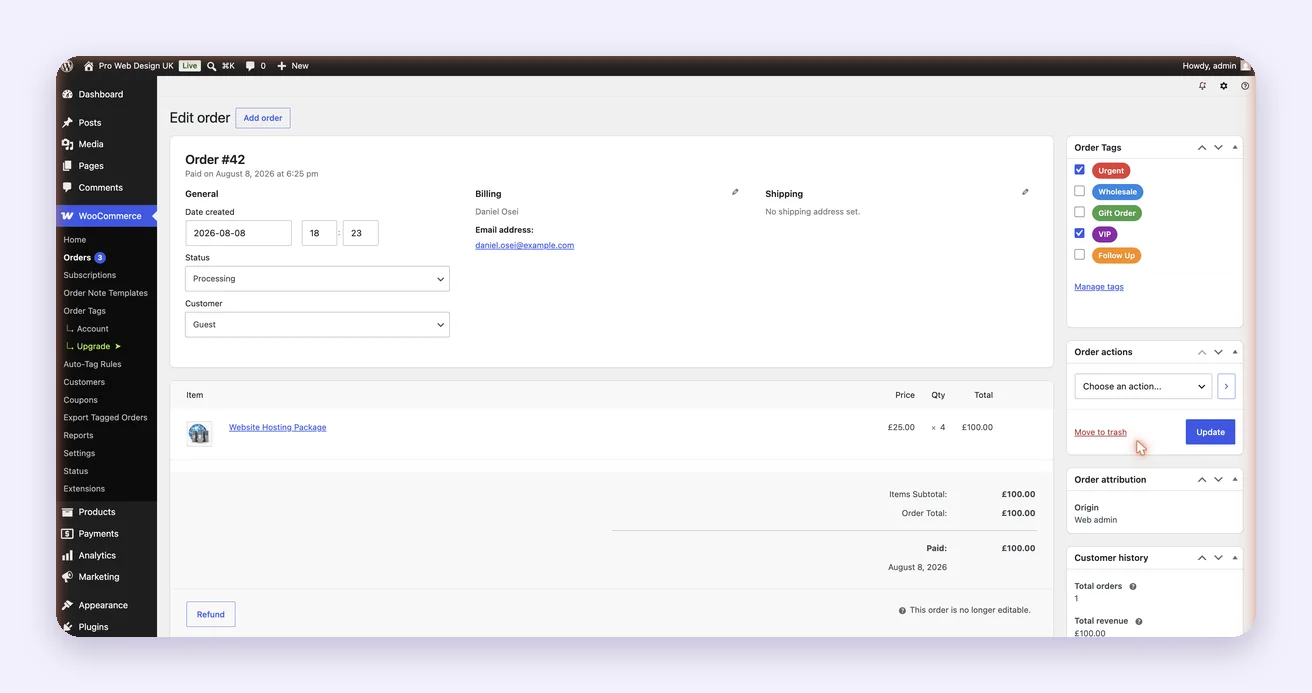
Assign tags from the order edit screen.
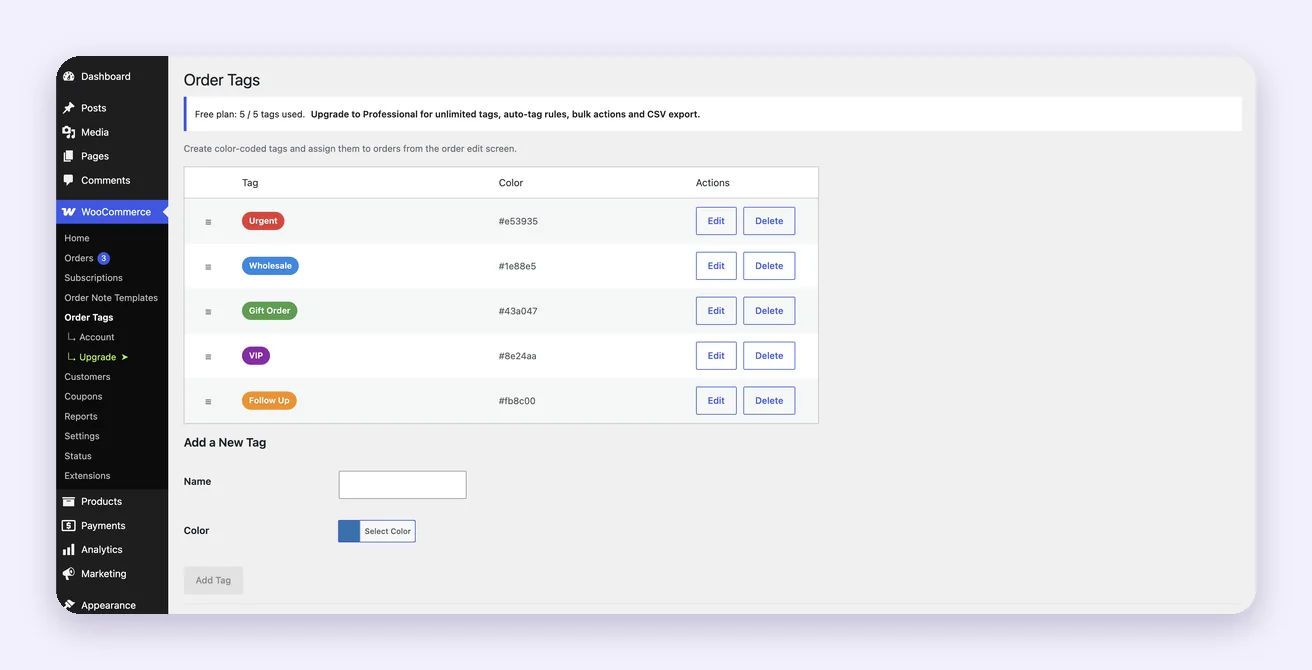
Create tags and pick colours under WooCommerce → Order Tags.
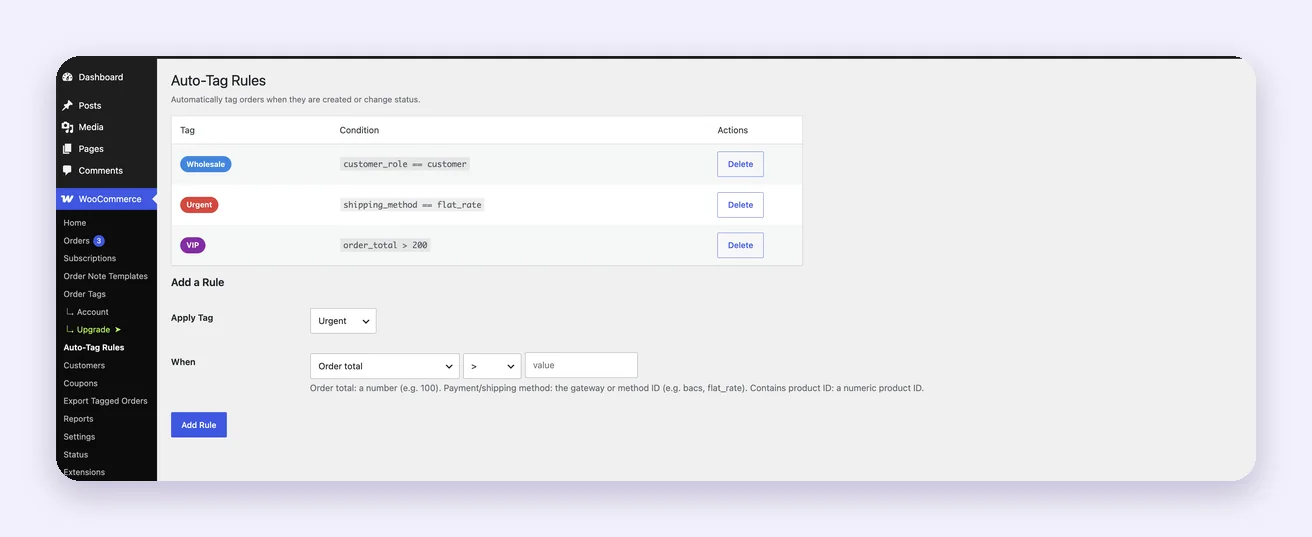
Auto-tag rules: orders get tagged the moment they match. Professional.
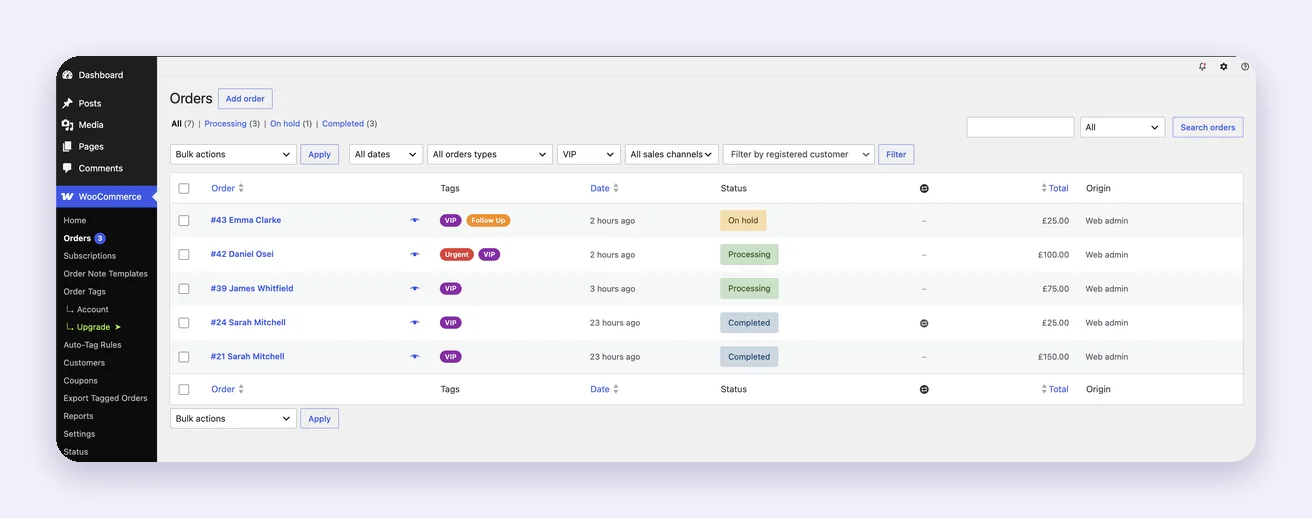
Filter the Orders list down to one tag. Professional.
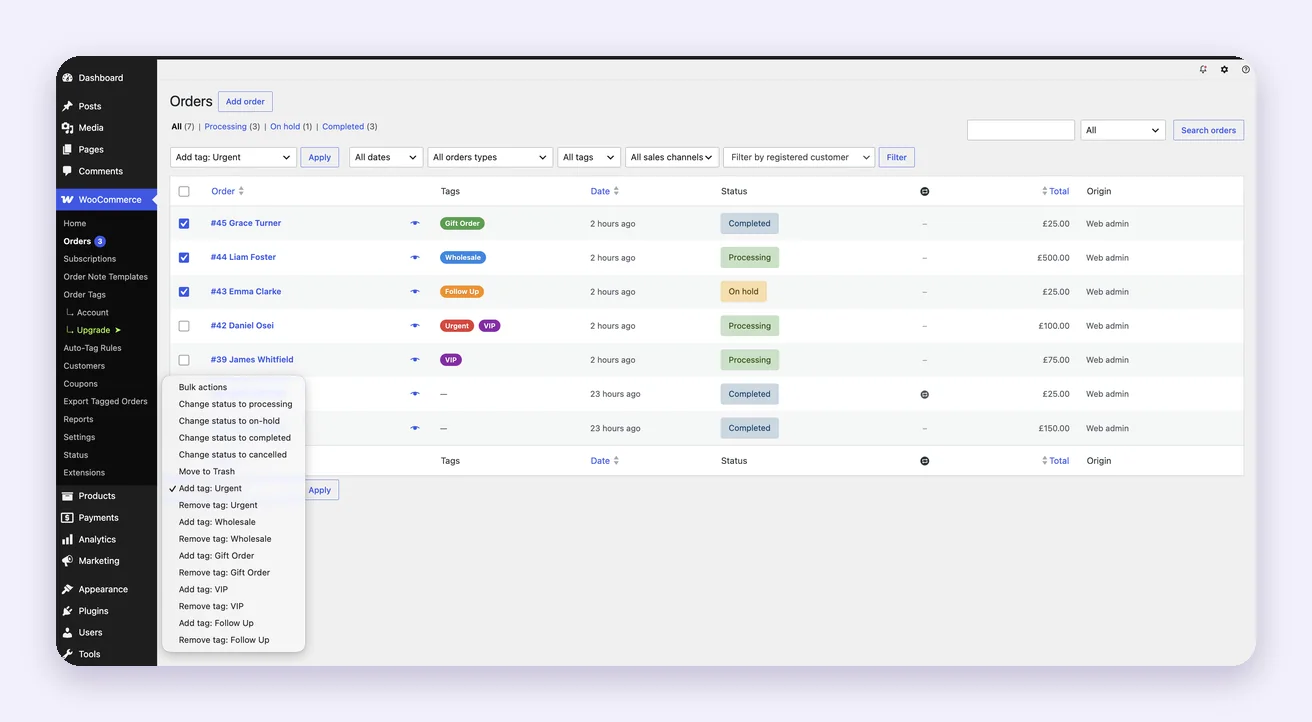
Add or remove a tag on many orders at once. Professional.
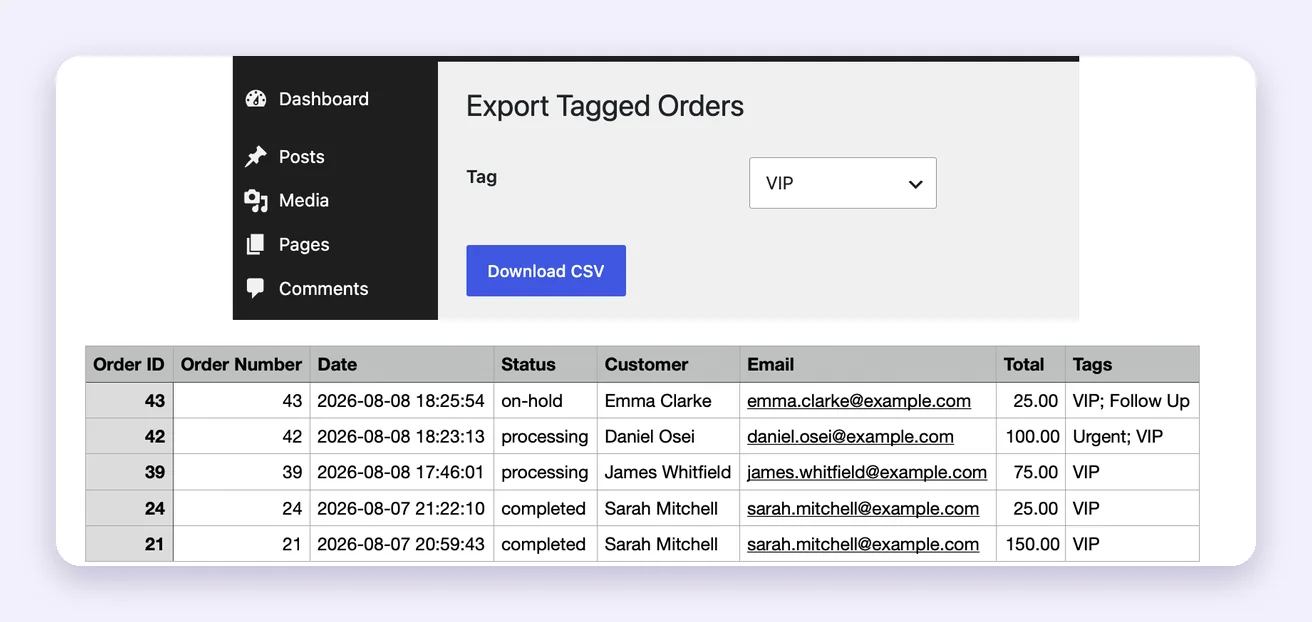
Export tagged orders to CSV. Professional.
Simple Pricing
Free
£0
Perfect for small stores
- Up to 5 custom tags
- Assign tags from the order edit screen
- Tags column on the Orders list
- Full HPOS support
Not included: unlimited tags, auto-tag rules, filtering, bulk actions, CSV export, Subscriptions support.
Professional
£24/year + VAT
or £64 + VAT one-off lifetime licence
- Unlimited tags
- Everything in Free
- Auto-tag rules
- Filter the Orders list by tag
- Bulk add and remove tags
- CSV export of tagged orders
- WooCommerce Subscriptions support
- Priority email support
No credit card required. VAT is added by Freemius, our payment platform, according to your country — it is not charged by us.
Frequently Asked Questions
Does it work with HPOS?
Yes. The plugin declares full HPOS compatibility and also works on stores still using the legacy post-based order storage.
Does it work with WooCommerce Subscriptions?
Yes. Tagging subscription orders by hand works on both Free and Professional. Auto-tag rules that reference subscription status are a Professional feature.
How many tags can I create on the free plan?
Up to five. Professional removes the limit and adds automation.
Can I filter the Orders list by tag?
Filtering and bulk tag actions are Professional features.
Can I try Pro before buying?
Yes — a 14-day free trial, no credit card required.
What happens when my licence expires?
Your tags and assignments stay. Pro features such as auto-tag rules, filtering and bulk actions stop working until you renew.
Do you offer refunds?
Yes, 30 days, no questions asked.
Can I use one licence on several sites?
A single-site licence covers one production site plus unlimited localhost installs. Write to us for multi-site pricing.
Is VAT included in the price?
No. Prices are shown without VAT. The sale is handled by Freemius as merchant of record, and Freemius adds VAT according to your country at checkout.
Bring Order to Your Orders Today
Install the free version in under a minute. Upgrade whenever you are ready for automation.
Download from WordPress.org Get Pro — £24/year + VAT
Questions before you buy? Write to support@pro-webdesign.co.uk.